
Home/Token Setup Assistance
Free With Every DSC & USB TokenToken Setup Assistance — Free USB Crypto Token Installation Support
Get free Token Setup Assistance for your USB Crypto Token and Digital Signature Certificate. Our team helps you install drivers, bind your DSC to the token, and configure it correctly for GST, MCA, DGFT, ICEGATE and e-Tendering portals — remotely or with step-by-step guidance.
Dedicated Support Team
Phone, WhatsApp & remote help
No Technical Skills Needed
We guide you every step
Completely Free
No charge for setup support
Fast Turnaround
Most setups done in 30 minutes
Your Token Setup Assistance Process
From unboxing your USB Crypto Token to signing your first document — here's how our setup support works.
Contact Support
Call, WhatsApp or request a callback once your token and DSC arrive.
Install Drivers
We help install the correct USB token driver for your operating system.
Bind Your DSC
Your Digital Signature Certificate is loaded and bound to the token securely.
Configure Portal
We help set up signing on GST, MCA, DGFT, ICEGATE or GeM as needed.
Test Signing
We confirm everything works by testing a sample sign operation with you.
What Is Token Setup Assistance?
Token Setup Assistance is dedicated support that helps you correctly install, configure and use your USB Crypto Token with your Class 3 Digital Signature Certificate. A USB token requires driver installation, secure DSC binding and correct portal configuration — and getting any one step wrong is the most common reason people struggle to sign documents after receiving a brand-new DSC. Our setup assistance removes that friction entirely.
Why it's often needed: USB Crypto Tokens like mToken and ProxKey require specific vendor drivers to be recognized by Windows. Without the correct driver, your token may show up as an unrecognized USB device, or your DSC may fail to appear inside signing software such as Adobe Acrobat, the GST portal's emSigner utility, or the MCA21 signing applet. Token Setup Assistance solves exactly this class of issue.
How iSaral supports you: Every Digital Signature Certificate and USB Crypto Token purchased through us includes free driver installation guidance, DSC binding support, and portal-specific configuration help — over phone, WhatsApp, or remote screen-share, at no extra cost.
Beyond first-time setup: Setup assistance also covers common follow-up situations — reinstalling drivers after a Windows update, re-binding your DSC after a system reset, or configuring your token on a new laptop when you switch devices.
Who Typically Needs Token Setup Assistance
USB Token Driver & Portal Compatibility
A quick reference for which drivers and configuration are typically needed for common signing platforms.
| Platform / Portal | Signing Method | Setup Support Provided |
|---|---|---|
| GST Portal | emSigner Utility | ✔ Included |
| MCA21 / ROC Filing | Browser Signing Applet | ✔ Included |
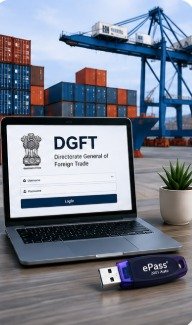
| DGFT Portal | Token-Based Signing | ✔ Included |
| ICEGATE | Token-Based Signing | ✔ Included |
| GeM / CPP Tender Portals | Token-Based Signing | ✔ Included |
| Adobe Acrobat PDF Signing | Certificate-Based Signature | ✔ Included |
Exact configuration steps vary slightly by portal and browser version — our support team walks you through the specific setup for the portal you need.
USB Token Setup — DIY vs. With Our Assistance
❌ Setting It Up Yourself
- Guessing which driver version matches your token
- Risk of installing the wrong or outdated driver
- Confusing portal-specific signing settings
- Hours lost troubleshooting "token not detected" errors
- No one to call when something doesn't work
✅ With Token Setup Assistance
- Correct driver identified and installed for your exact token model
- DSC binding done correctly the first time
- Portal-specific configuration guided step by step
- Setup completed in 15–30 minutes on average
- Ongoing support if issues come up later
USB Token Problems Our Setup Assistance Resolves
Token Not Detected
Windows doesn't recognize the USB token as a connected device — usually a missing or outdated driver.
Certificate Not Visible
The DSC doesn't appear in the signing dropdown of a portal or PDF application after installation.
PIN / Password Errors
Repeated PIN prompts or lockouts when trying to access the token's stored certificate.
emSigner / Applet Failures
The GST or MCA signing utility fails to launch or connect to the browser correctly.
Driver Conflicts
Older driver versions conflicting with newer Windows updates, causing signing failures.
New Laptop Migration
Reconfiguring your token and DSC after switching to a new or reformatted computer.
Benefits of Token Setup Assistance
Fast, Guided Setup
Most tokens are fully installed, bound and tested within 15 to 30 minutes.
No Technical Skill Needed
Our team handles the technical steps — you don't need to know anything about drivers.
Remote Support Available
Screen-share assistance means you don't have to visit our office for help.
Portal-Specific Guidance
We configure signing correctly for GST, MCA, DGFT, ICEGATE and GeM.
Completely Free
Included at no extra cost with every DSC and USB Crypto Token purchase.
Ongoing Support
We're available for follow-up help — driver updates, new devices, or PIN resets.
Token Setup Assistance — Frequently Asked Questions
Need Help Setting Up Your USB Token?
Our support team will walk you through driver installation, DSC binding and portal configuration — completely free of charge.
Explore Our Digital Signature Services


Stuck Setting Up Your USB Token?
Get free Token Setup Assistance from our support team and start signing documents in minutes, not hours.